Hi Tom,
I have tried that and still got an endless loop.
To better test... I have disabled those changes and I have extracted the offending part from the app and attach a demo bsv.
Load up the bsv and run it.
You will see a Query of Results of All Remuneration Templates
Edit the record DEMO REMUNERATION Template.
You will see this Remuneration Template Form with it's Remuneration Template Components in the child Reference table.
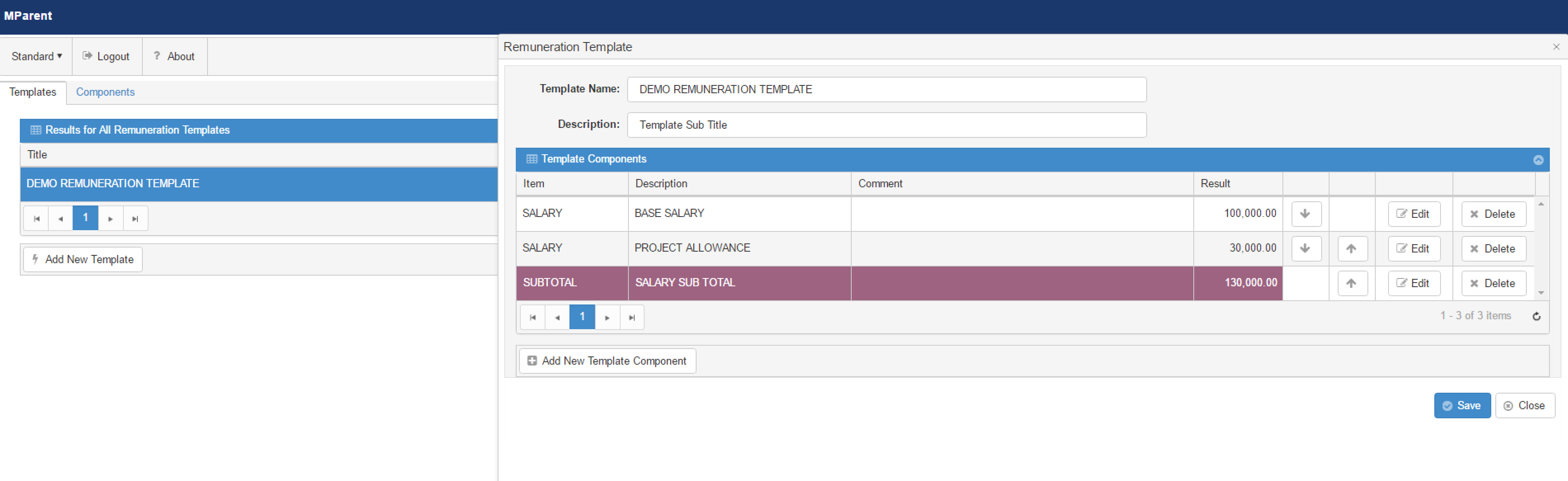
The Base Salary is just a value.... 100,000
The Project Allowance is a Percentage.... edit it and you can see it is set to 30% of the SUM of the Aggregates Components
The SubTotal is of type A+B and the Operands are set to the Base Salary and the Project Allowance.
So... now to the issue...
Edit the Base Salary and change it to 200,000 and save it.
You will see that the new value is reflected in the Result and , interestingly, the Sub Total row updates to show
200,000 + 30,000 = 230,000.
However, the Project Allowance row did not update. It should change to 60,000 being 30% of 200,000. And accordingly, the Sub Total should
then be 260,000.
That is what I am trying to get it to do.
Now.... Click the Save button on the Remuneration Template Form.
Notice how the Rule on the Remuneration Template BO gets executed and all of the Remuneration Template Component lines get recalculated properly.
Hence, the original question..... How to Force the Remuneration Template BO to save (and thereby executing the update of the child components) without having to click the Save button?
