It is all becoming clear to me now. (finally!) how Aware processes records when there is more than one returned. I stumbled a lot when I was trying to implement my business rules of converting customer quotes into orders. It will help if I explain the customer’s requirements before continuing:
• Each customer can have multiple quote lines
• Each quote record can have multiple Quote Tally Records
• Each customer has 1 CustomerQuoteSummary (CQS) record
• Quotes can be optionally added to (or removed from) the CQS
• When one or more Quotes are in the CQS and the customer wants to turn them into an order the following is done:
o A form opens asking for the Customer’s PO Number
o Then create an order header (one order header no matter how many quote lines) which has some information from the customer and some information from one of the quotes.
o Create an Order Line record for each quote selected
o Create Order Tally records for each Order line (so, if a quote line has 10 Quote Tally records, then this order line will have 10 Order Tally Records
o Update all of the Quote Lines with the PO Number and change the status from quote to order
o Finally, remove all of them from the CQS relationship
Where my understanding was faulty was the way Aware works with multiple records. I come from a SQL background and think of logic in a SET mode and not procedurally. While you can create what is called a CURSOR in SQL and process records one at a time, it is very seldom the best solution. So while the Aware documentation tells me that the following works:
FIND BO WHERE …..
BO.field = ‘XYZ’
I made the assumption that FIND BO WHERE ….
BO.field = BO.relationship.field would work also. This is not the case.
In SQL the 1st example would translate to:
Update BO set field = ‘XYZ’ where BO ……
And the 2nd example would translate to:
Update BO set field = relationship.field
From BO inner join Relationship on ….
WHERE ….
So, I can’t use the 2nd example as is, but whenever I need to update 2 or more records and the data is not all contained in the BO that was in the FIND (or passed to the procedure in the input BO) I need to write it as:
FIND BO WHERE…..
subProcessName
Here is where it was confusing to me (and perhaps to others, although I know most of you are smarter and better looking than me…)
How many times will the SubProcess be called?
It will be called the PRODUCT of the # of records in context for EACH of the BO’s in the input section of the SubProcess. If the SubProcess has one Input BO (like most do) then the SubProcess will be called once for each BO that is in context. If, for instance, the SubProcess has Customers and OrderLines as input BOs and there are 2 customers and 4 orderLines in context, then it will be called 8 times! This might not be what you want!
I have, in the past, had more than 1 input since I figured this would speed things up, so Aware does not have to do any extra “finds” but this might give you results you didn’t expect.
If you do have BATCHES OF 1 in your process and there are multiple records found, when calling a sub-process it seems like Aware does not always remember the last record it was on and might call the sub-process with a different record ID (Found this out with some testing…)
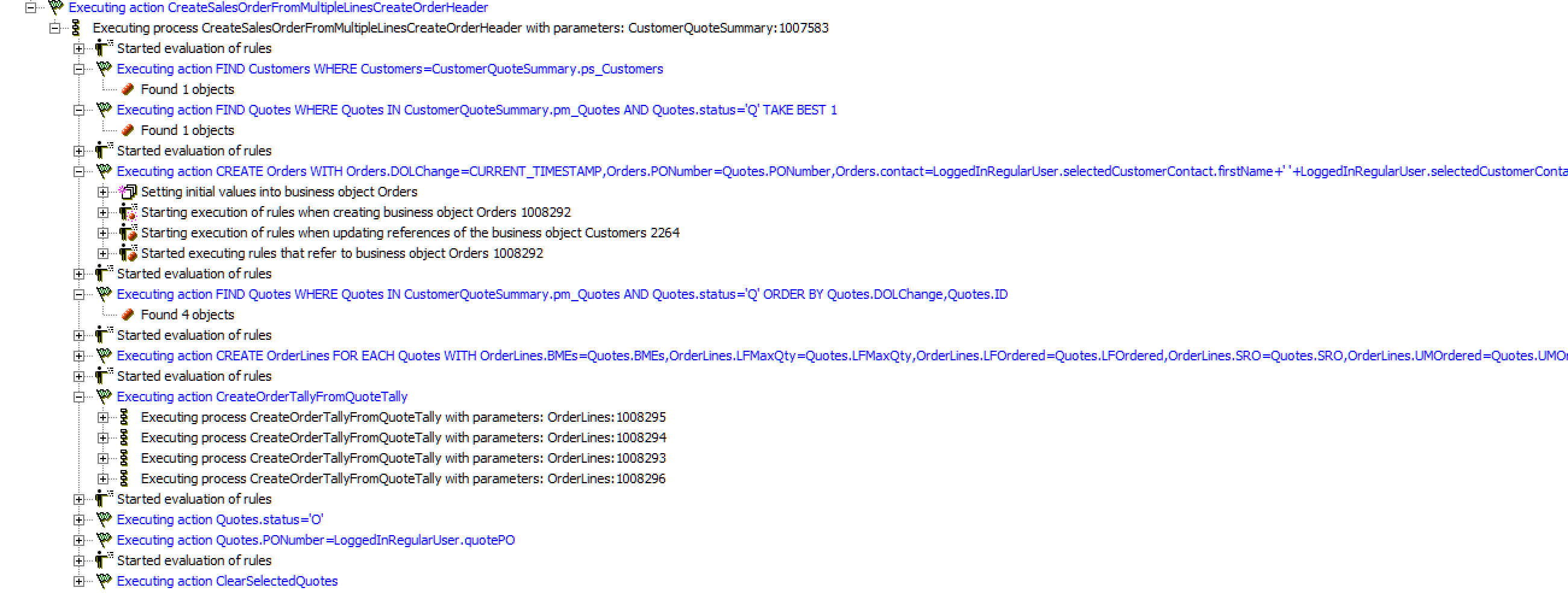
Not sure if this will help anyone, but let me show you the process(s) that are called when I want to turn a quote into an order, and a copy of the log. The following process is called passing in the CustomerQuoteSummary:
Step1: Find the Customer and one of the Quotes:
FIND Customers WHERE Customers=CustomerQuoteSummary.ps_Customers
FIND Quotes
WHERE Quotes IN CustomerQuoteSummary.pm_Quotes AND Quotes.status='Q'
TAKE BEST 1
Step2: Create the Order Header record:
CREATE Orders WITH
Orders.DOLChange=CURRENT_TIMESTAMP,
Orders.PONumber=Quotes.PONumber,
…….
Step 3: Find all of the Quotes to turn into OrderLines:
FIND Quotes
WHERE Quotes IN CustomerQuoteSummary.pm_Quotes AND Quotes.status='Q'
ORDER BY Quotes.DOLChange, Quotes.ID
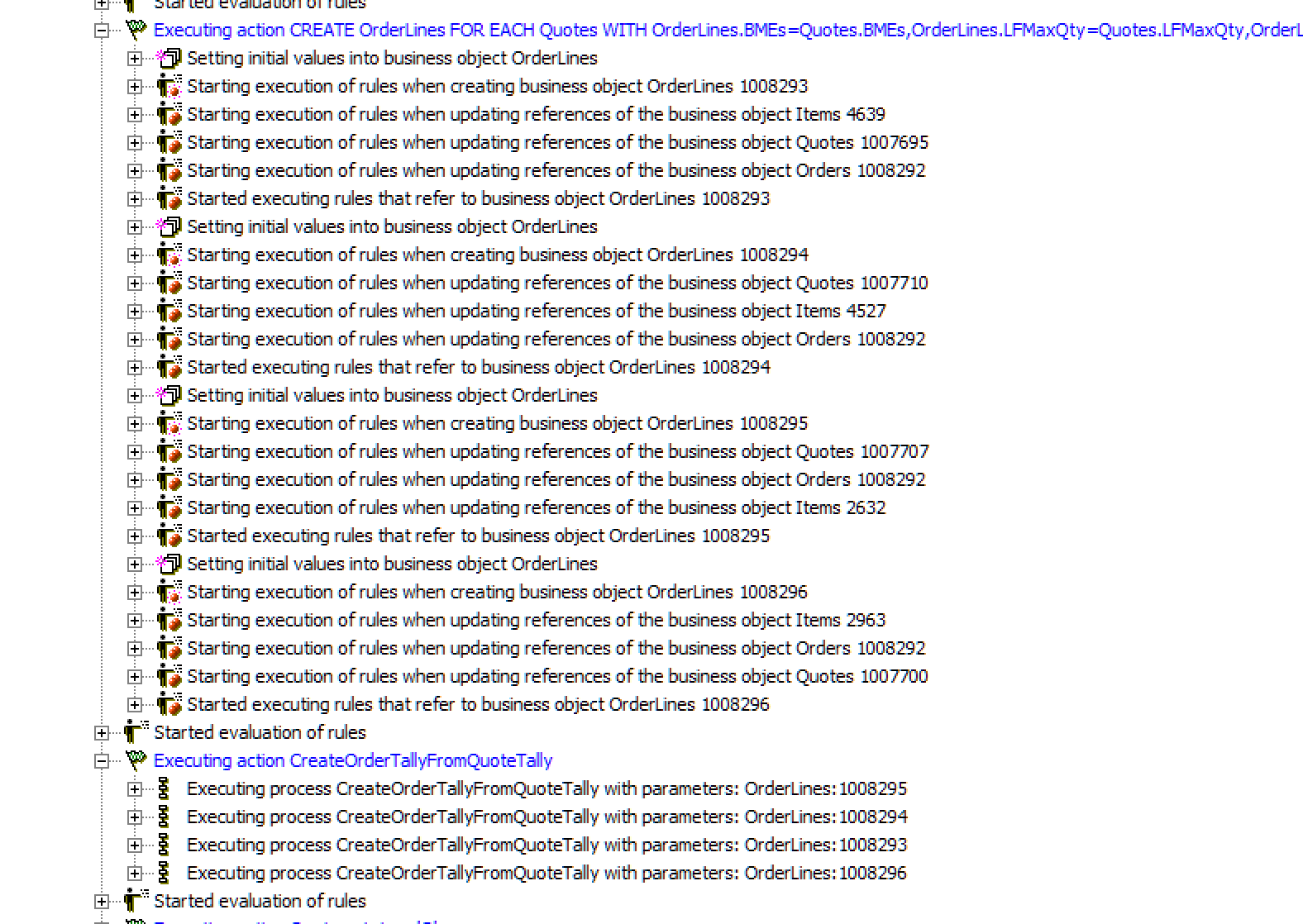
Step 4: Create an order line for each quote line:
CREATE OrderLines FOR EACH Quotes WITH
OrderLines.BMEs=Quotes.BMEs,
OrderLines.ps_Quotes = Quotes,
….
Step 5: Create Order Tallys for each Order Line just created
CreateOrderTallyFromQuoteTally
(This process has OrderLines as INPUT and looks like:
FIND Quotes WHERE Quotes =OrderLines.ps_Quotes
FIND QuoteTally WHERE QuoteTally IN Quotes.om_QuoteTally
CREATE OrderTally FOR EACH QuoteTally
WITH OrderTally.ob_OrderLines=Quotes.ps_OrderLines,
OrderTally.Modifier=QuoteTally.Modifier,
….
Step 6: Update Quote Status to Order and save the PO Number
Quotes.status ='O'
Quotes.PONumber =LoggedInRegularUser.quotePO
I am attaching 2 screen shots of the log, the 2nd has step 4 expanded: