I am sure you much smarter and better looking developers have already figured this out. But it took me a while to get my arms around this. (And a HUGE thanks to Mark Bailey. without his patient help, I would still be trying to figure out how to get this to work.
Overview. It is easy to use FIND and WHERE when the parameters to filter the record are either in the desired BO, or the can be followed up a chain of related records where there is a single relationship.
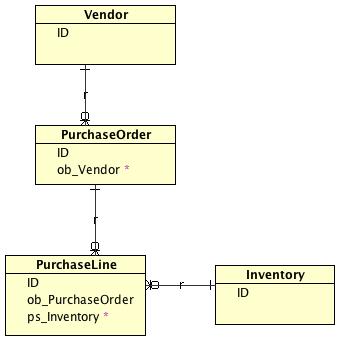
Example: (And look at the attached image to see an ER Diagram showing the relationships.)
If I want to find all of the PurchaseLines for vendor 1234 I can write FIND PurchaseLines WHERE PurchaseLines.ob_PurchaseOrder.ob_Vendor = 1234.
However, my requirement was to find all Inventory Items that have ever been purchased by vendor 1234. (And I needed to have the BO be the Inventory, not the PurchaseLines with a bunch of shortcuts.
With Mark's help (Ok, he really did ALL of the work, I just sat there and tried to look pretty), the following was written and tested.
FIND Items WHERE EXISTS PurchaseLine
WHERE (PurchaseLine.ob_Inventory=Inventory AND PurchaseLines.ob_PurchaseOrders.ob_Vendors=1234)
Figured it made sense to share this, since others might have been scratching their head trying to accomplish similar
Bruce