| Build Number | Database | OS |
|---|
| 3529 | | Windows |
This isn't really a bug, but some forms do not work as expected so I'd thought it useful to post here.
I have noticed that the "Display mask" option for forms is not always taken into account. In some cases, the "busy loading" mask is displayed even the Display mask option is not checked (i.e. off).
Here is the situation. I have a simple form with two switches, created in the Session object. Each switch has the "Save form on selection change" on.

When clicking the switch, the "busy loading" mask (i.e. the kendo.ui.progress loading image) is displayed for a short moment, even though the "Display mask" option is off.
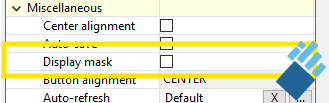
According to the tooltip on the display mask option, I would need to tick this to get the 'busy' mask upon recalcution of the form, and thus there shouldn't be a busy mask if not ticked. Furthermore, when a process is started from a form the default is to show the busy mask and this can be disabled by checking the "Disable 'Executing' mask" option for the Start Process operation on the form (more on that below).
If I have the possibility to turn on/off the display mask for operations that take more time (recalculate the object, running a process), it should definitely be possible to avoid the display mask on very short operations like changing a switch.
I have done some investigation in the Aware js code to find a possible cause for this behaviour. What I could find is this:
When the "Save form on selection change" option is ticked, formParser.lightSaveForm() is called. This runs the AwareApp_PostFormDataAction() function. The default for that function is to have the "busy mask" displayed (I added a comment to the js code below):
var AwareApp_PostFormDataAction = AwareApp_ServerCallAction.extend(

{

	init: function(formParser, options)

	{

		AwareApp_ServerCallAction.fn.init.call (this, options);

		this.m_loadMask = true; // <<< display of the "busy mask" is the default.
The AwareApp_RecalculateObjectAction or the AwareApp_RecalculateConditionsAction are both derived from AwareApp_PostFormDataAction and they have the parameter forceLoadMask, which presumably corresponds to the "Display mask" setting for the form. This isn't available for the base class AwareApp_PostFormDataAction so the busy mask is displayed because that is the current default.
The most simple solution would thus be to change the line quoted above:
As a work around, I have written a short init script for the form that changes the setting. This seems to work fine, but I would kindly suggest to change the Aware javascript code so that the "Display mask" setting is honoured.
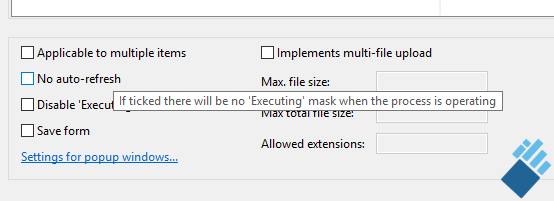
On a related note, it seems that the tooltip for the "Disable 'Executing' mask" option (in the settings for the Start Process operation) which reads "If ticked there will be no 'Executing' mask when the process is operating", is connected to the wrong item. This tooltip is displayed when hovering over the "No auto-refresh" option, instead of the "Display 'Executing' mask" option. The tooltip disappears when the cursor is moved to the "Disable 'Executing' mask" option. Below the screenshot showing the tooltip. You can't see the cursor here, but you can easily verify that the tooltip pops up at the incorrect setting.