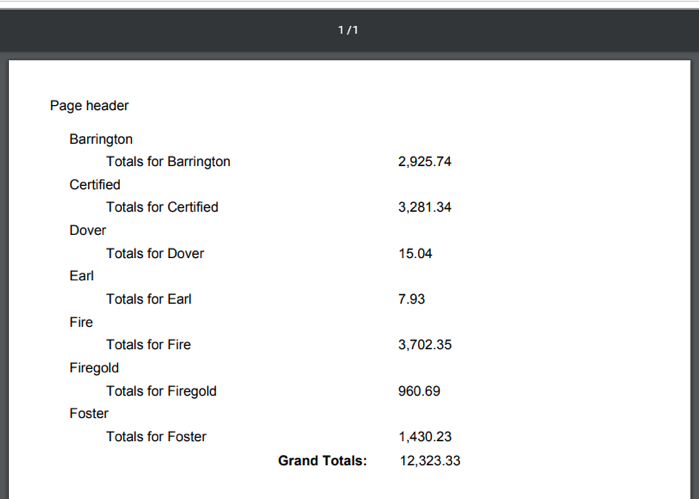
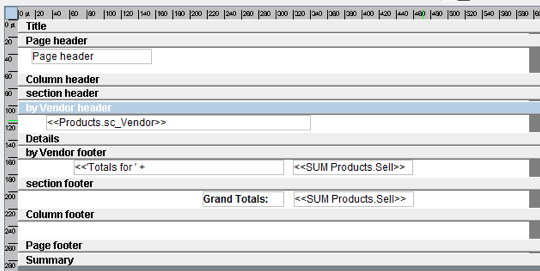
you can see from the pics that this is achievable
but when you put your GRAND TOTALS in the column or page footer, they go to the bottom (as you said).
I have created a "ghost" section that doesn't really do anything except acts as a placeholder for GRAND TOTALS and it is "outside" the loop of each vendor. And has no grouping defined. This makes it display when the inner group (Vendor) is finished and thus the TOTALS appear in the proper place. (Mine was named "Section")
Since you have already created your group, you'll need to:
1) Click on Page Header band
2) Make a new Group, lets name it "Totals"
3) To be safe, click on Totals Header, then Make ANOTHER Material group. Now its "inside" Totals.
4) Copy/Paste the fields from existing Material Group to the new Material Group
5) Delete the OLD Material Group (From the Tree on the left.)
6) You'll need to redefine the group by property (In the SUM field) - I think it will throw an error if you try to save before doing this
7) Make sure you set the Totals Header and Detail Bands HEIGHTs TO ZERO (they are only set to 1 by dragging)
jaymer...