Posted cause its a Ghost Town SLOWWWWW Friday here on the Forum
In my scenario, we need a user to submit a minimum of 4 pictures of his Vehicle.
Front,rear,left,right, with 2 optional pics allowed.
I don't want them to deal with the desktop-UI process of Aware where they add a record, then click to add another, or monkey with the finicky Inline Editing.
This is MOBILE so they can walk around their car, but it can also be done on a PC.
so, I'm creating some placeholder recs for their submission.
A parent record with general details and then a child reference BO with 6 lines in it.
These 6 recs will hold their 4-6 images they submit.
AND, to help them, I added a name for the image so they know which image goes where...
front
rear
left
right
extra1
extra2
PS _ I know what your thinking... why deal with parent child etc. Just create 6 image fields in the main rec and let them assign pics to them.
---> I actually did it this way and had it all working, and then found out about the Image Gallery and that it works on 1 Attribute across many records, vs. 1 record with 6 attributes. I wanted the admin user to be able to see the submitted images using a gallery, to peruse them, etc. Perfect fit for what Vlad has included, except I needed to fit into HIS data structure, hence the re-do. But I digress.......
Remember, there is no IMAGE "yet".
When a process tries to create the "structure" for the submission, if the PATH is empty, it fails.
There cannot be a path yet, cause there is no image.
I tried to set the path to a "no image" file, but when the user finally uploads an Image, it erases the "no image" file that all the other placeholder recs are pointing to, creating more problems.
So, I finally init the path to 'c:\images\Entry1001\' and at least its a path so it doesn't complain.
Everything seems to work fine - a user can upload a real image and THEN it corrects this path.
There is not "no image" file to erase. Life seems good.
So, I'm adding final touches to the Management screen where an admin can view the uploaded images.
Following what happens in the PhotoAlbum, I use the nifty built-in ImageGallery.
EXCEPT it now complains that the default path (which worked to get me this far) is incorrect.
It seems that when the Gallery "starts", it reads in all the images, so it won't even start up unless everything is in order.
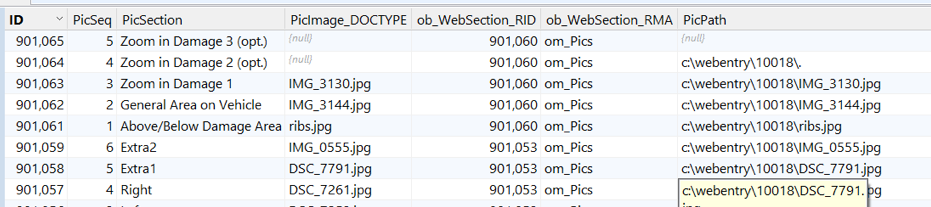
The 1st 2 records make it crash.
(You have to scroll the image to the right)
The 2nd line has the bad path, so i tried making it null (see the top line)
Then it gets a different error when its null.
So I made the Path a valid path pointing to my "no image" file.
Then it gets a diff. error because the DOCTYPE doesn't have the filename in it.
Fixed all 3 of those things and the Gallery starts up.
So I have to go back to making a Valid Path before the admin function, or as far back as when I create the data.
Its always something.
Happy Friday
