I have a Plain Text field (Status). Set to use Dynamic Choices calc'd at Runtime.
(Basically, uses a Query to display only a certain set of options based on your user level)
NOTE: Originally, this was a simple field using Aware "Choices". However, Choices does not allow any Logic to limit which choices are shown.
Example: Men work on floors 1,2,3. Women on Floors 4,5,6. Valid Choices are 1,2,3,4,5,6. But no way to limit what choices are shown when viewing the pulldown. So I made a Table of Choices with an additional column "Sex". At runtime, the Custom Query kicks in and only shows Choices for the current Sex.
This does NOT need to be (and WILL NOT BECOME) a reference field.
This main file will be accessed 10,000+ times a day - I don't need an additional Query to hit the "Floors" table for every row in the grid that is displayed by hundreds of users every day, which is what happens to every ps_xxxx Peer field in the main table of the grid.
This is an issue simliar to Access Levels which was presented here: https://forum.awareim.com/d/10362>
# 1 :?: Using Status in the pic below, HOW DO I force selection of 1 of the choices in the pulldown? because it lets me type in my own value and/or leave it blank.
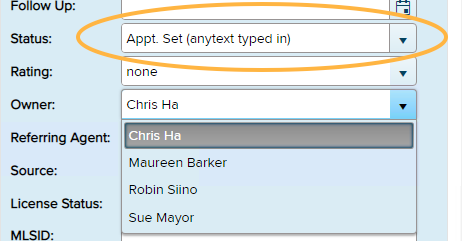
Appt. Set was the option from the pulldown. I typed the rest in manually.
Should I use Required or Calculated in the setup of the field so the user cant type anything?
I'd think this Dialog box would be the perfect place for a checkbox (or a few):
---> [ ] Require a selection from Choices
---> [ ] Choice can be left Empty
---> [ ] ?????
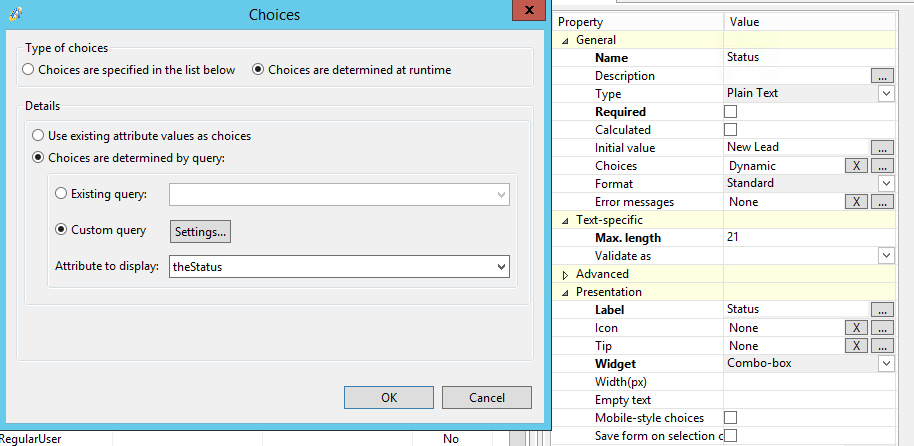
SOLUTION TO # 1:
I made a Rule in the Lead table (thats the main customer/person table shown in the above pic.)

