
OK, we need to make a custom Javascript file. You may not have the JS directory, but may already be using custom CSS.
Add a JS dir in CUSTOM folder and make a text file. "myjs.js"
in that file, paste this:
var _GridConfigPaging_InitScript = function(config, parser, markup, widgets)
{
config.noRecords= {
template: "No records have been found"
}
config.columnResizeHandleWidth=10
}
You can try other values and see what works best. 15 or 20 even.
then, go to your query, and paste this in Scripts as shown:
_GridConfigPaging_InitScript (config, parser, markup, widgets);
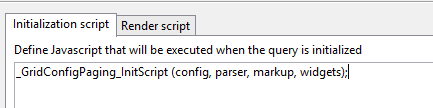
thats it.
the JS gets loaded automatically when you refresh your session.
Also, try filtering on that query where you will get 0 records found.
You'll get that handy message instead of a big blank window.
jaymer...
PS _ Credit to the JS/Kendo Tinkerer, Jon Talbott, for graciously helping me get into this area of voodoo.
PPS _ I've always wanted to tell you... and hopefully, in person one day over a pint of BROON, of a fantastic story of how me and a mate found ourselves driving through Scotland on the night of Nov 4.
