Its surprising how many aware ppl I talk to who have NOT used the included Report Designer.
Technically, that even includes Bruce, because he uses the full Jasper externally.
Any maybe until a year ago, I was in that boat... having never really used it.
I recently discovered the new TABLE "tag", control, or whatever its called.
Here's a mini view of the report I'm discussing in this post:
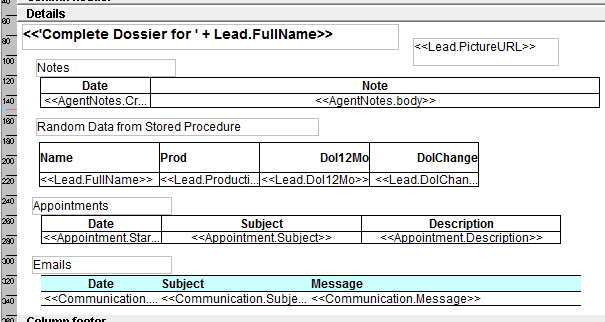
This report gets passed to it a list of LEAD IDs (the context).
You can add a button in a Row Operation, or a Panel Header (allowing Multiple and let a user select rows to print) and use CREATE DOCUMENT and point to the report.
Thats it. EASY.
You could also run a Query that finds multiple BOs to print and pass them all at one time to the Reporter.
(NOTE: One thing not working for me was that there's an option to Page Break on each Detail section - its a check box that says "Start on new page", but it wasn't working for me. Each lead SHOULD start on his own page, but it didn't for me. Something def. minor and I'm a few builds old so it might be my version.)
You can see how all the fields are in the DETAIL band. So each Lead is going to print once, WITH all the om_children also printing.
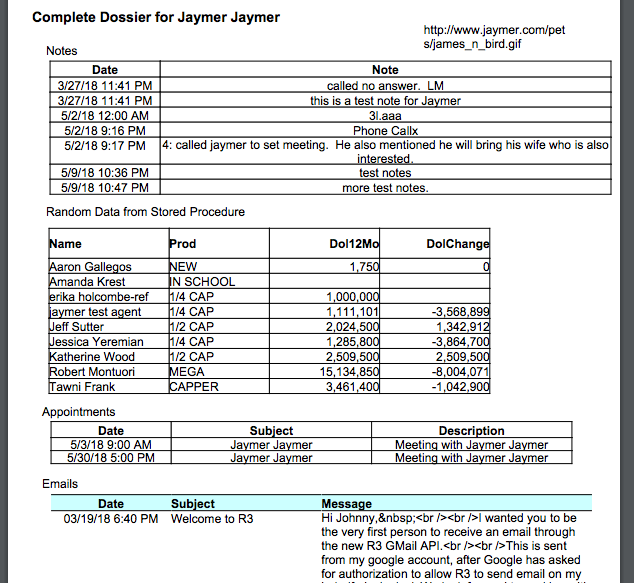
And here's a screenshot of what it produces:
Setup is pretty easy with VERY little learning curve. This is just for the Appointment list:
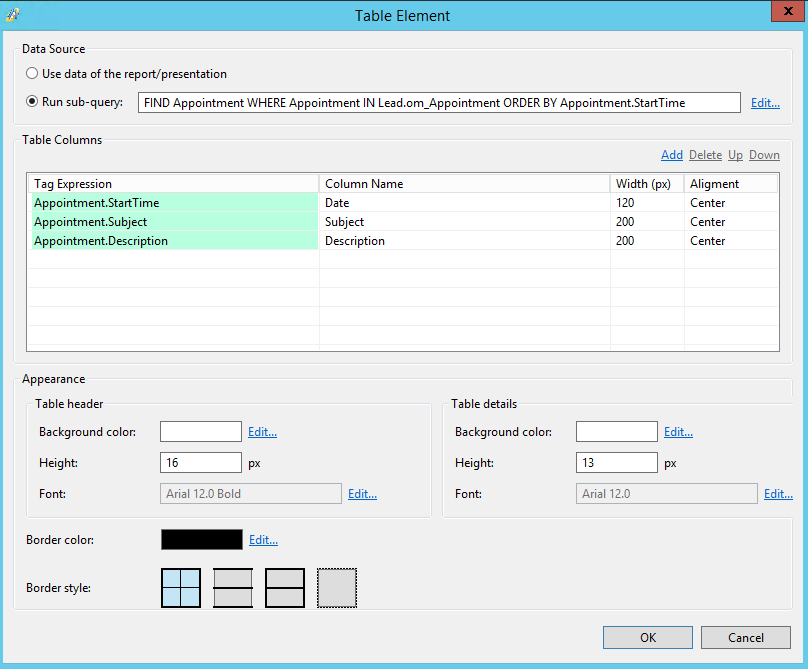
It was very painless to get this to do what was expected.
In the properties window for the Table, you'll most likely want the table to "float" instead of be anchored on the page - you'll probably forget this step and see the results - but it easy to remedy.
But very quickly, a few "immaturities" are exposed - things that can easily be fixed in future versions.
There's no HTML control (that I can see) - so I can't get my picture on the page. Yes, you can paste static images (logo) and you can print images in the db, but I only store a link to a pic on the web - on Aware screens I just have an HTML cell that shows the pic - but I don't see a way to do that here.
Also, you'll notice the HTML Email cells show the formatting and not the HTML, so you'd have to live with the tags, or make a 2nd "text version" if you wanted them on this report.
It IS nice that if a Table had NO ROWS, then entire table disappears - the heading is still there (something I added, its not part of the Table), but I could probably condition that element using
IF NOT EXISTS Appointments in Lead.Appointments (or something similar).
Maybe an option in the table setup would be nice - Message to display if no recs found, instead of jumping through hoops.
But its unclear how much of this is under Vlad's control vs. Jasper.
All in all, this new control will be PERFECT for some people depending on the app.
And then there's still the SubReport, but thats another story.
Jaymer...
